New & Notable

Manage
Top 4 mobile security threats and challenges for businesses
Mobile devices are a target for hackers, with several ways to steal data. These threats -- from network spoofing to phishing texts -- endanger organizations as much as individuals.
Evaluate
BYOD's outlook brightens in hybrid workplaces
As employees and organizations come to expect greater mobility, BYOD is an important consideration in the successful planning and execution of the remote and hybrid workplace.
Evaluate
Why should businesses use and accept Apple Pay?
Apple Pay is a popular payment method with Apple users, and many organizations have added the option at checkout. Find out why it can be beneficial to accept Apple Pay.
Get Started
7 mobile device security best practices for businesses
Organizations can't deploy mobile devices without accounting for their security. IT admins should follow these seven best practices to manage mobile device and data security.
Trending Topics
-
Mobile Application Strategy Get Started
Does Apple offer work profiles for iPhones?
Apple uses data and device containerization -- instead of the Android Work Profile model -- to split work and personal information on iPhones and support BYOD deployments.
-
Operating Systems & Devices Get Started
How to use Managed Google Play with Microsoft Intune
IT teams can connect their Managed Google Play accounts to Intune to get the best of both management tools. Integrate the two for easier Android Enterprise enrollment and more.
-
Mobile Security Evaluate
The ultimate guide to mobile device security in the workplace
Mobile devices provide connectivity for employees to access business data and communicate with colleagues, but these unique benefits come with specific security challenges for IT.
-
Mobile Infrastructure Evaluate
Could the iPhone 15's USB-C port drive device consolidation?
With the coming of the new iPhone with the USB-C port, organizations might look at this new compatibility feature as the impetus for some changes to their device policies.
-
Mobile Management Evaluate
BYOD's outlook brightens in hybrid workplaces
As employees and organizations come to expect greater mobility, BYOD is an important consideration in the successful planning and execution of the remote and hybrid workplace.
-
Unified endpoint management Manage
Top 4 unified endpoint management software vendors in 2024
UEM software is vital for helping IT manage every type of endpoint an organization uses. Explore some of the top vendors and how they compare.
Find Solutions For Your Project
-
Evaluate
The ultimate guide to mobile device security in the workplace
Mobile devices provide connectivity for employees to access business data and communicate with colleagues, but these unique benefits come with specific security challenges for IT.
-
BYOD's outlook brightens in hybrid workplaces
-
Why should businesses use and accept Apple Pay?
-
Finding the best mobile hotspot option for remote work
-
-
Problem Solve
How to set up Apple Pay for a business
Setting up Apple Pay is a simple process, but IT decision-makers should understand the considerations that come with it and how it varies for organizations of different sizes.
-
How do personal hotspots work for remote work?
-
Does a hotspot work when a mobile device has no service?
-
How to troubleshoot when a hotspot is not working on Android
-
-
Manage
Top 4 mobile security threats and challenges for businesses
Mobile devices are a target for hackers, with several ways to steal data. These threats -- from network spoofing to phishing texts -- endanger organizations as much as individuals.
-
What fees come with accepting Apple Pay for businesses?
-
Improve mobile hotspot security in 5 steps
-
Why businesses should recycle enterprise devices
-
Mobile Computing Basics
-
Get Started
7 mobile device security best practices for businesses
Organizations can't deploy mobile devices without accounting for their security. IT admins should follow these seven best practices to manage mobile device and data security.
-
Get Started
What fees come with accepting Apple Pay for businesses?
Apple Pay simplifies checkout for customers, but setup isn't always as straightforward. IT admins can review the costs to decide if Apple Pay makes sense for their organization.
-
Get Started
Samsung Galaxy
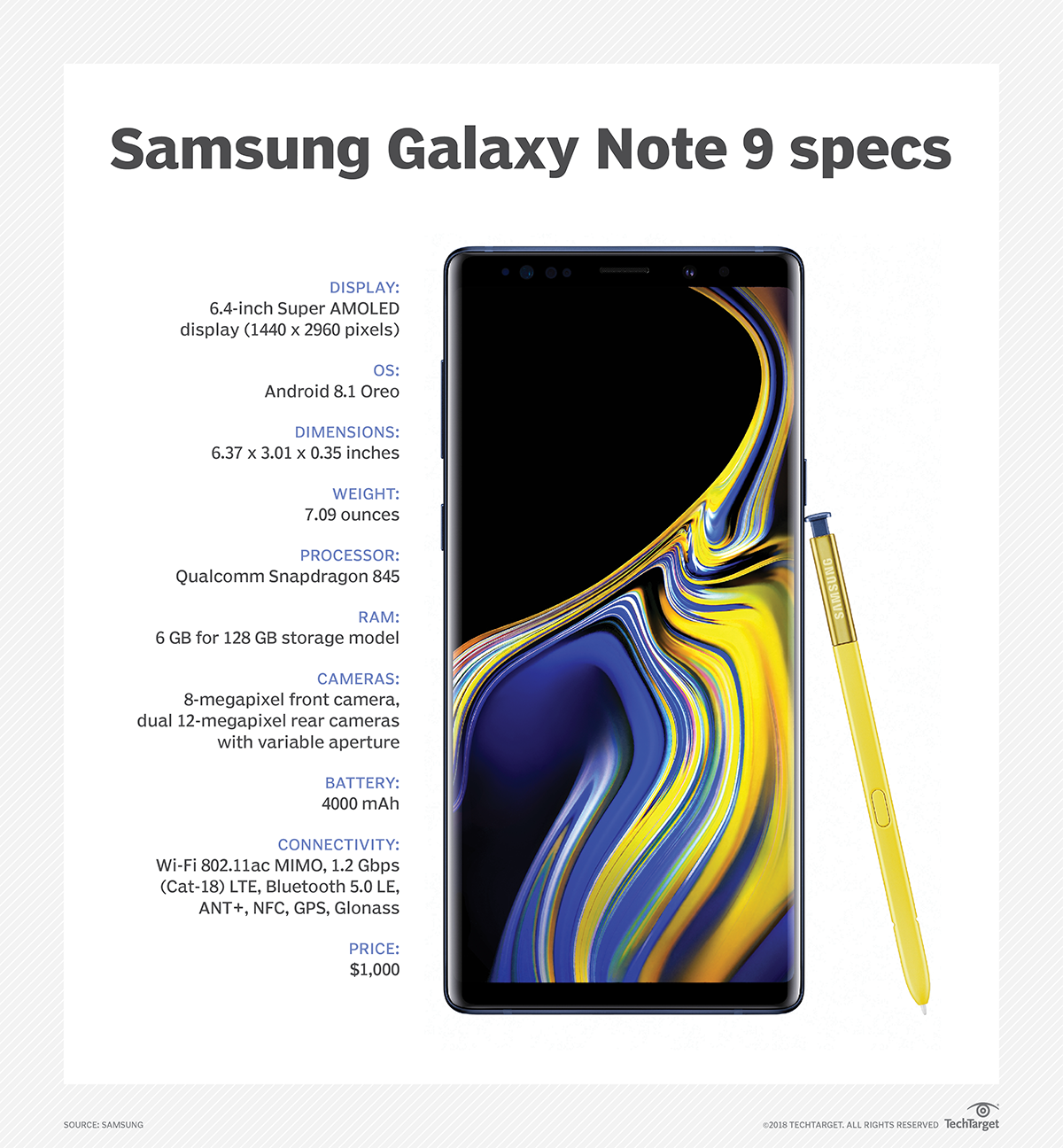
Samsung Galaxy is a product line of Android smartphones, tablets and internet of things devices manufactured by Samsung Electronics.
Multimedia


-
News
View All -
Mobile operating systems and devices
Samsung seeks bigger role as a business mobile provider
Samsung's wide variety of mobile devices, partnerships with software makers and government-grade security are differentiators in the business market, analysts said.
-
Mobile management
Jamf Q&A: How simplified BYOD enrollment helps IT and users
Jamf executives at JNUC 2022 share their vision of the future with simplified BYOD enrollment and the role iPhones have in the enterprise.
-
Mobile security
Jamf to acquire ZecOps to bolster iOS security
Jamf will pay an undisclosed sum for ZecOps, which logs activity on iOS devices to find potential attacks. The companies expect the deal to close by 2023.